

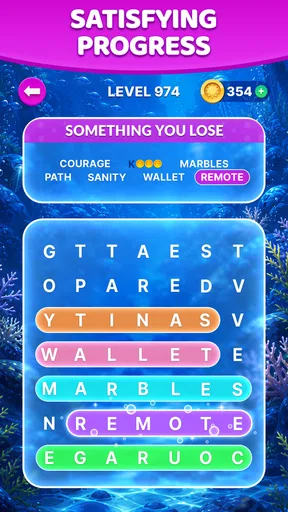
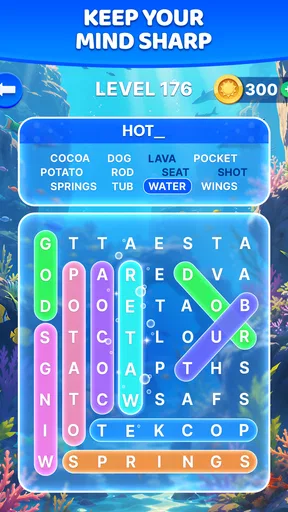
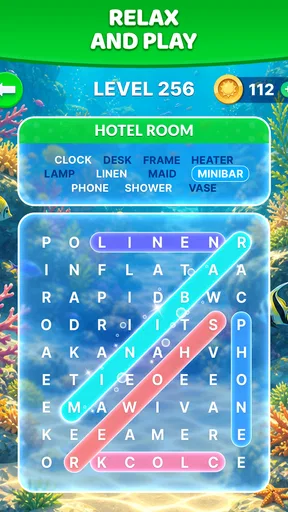
Wordscapes Search: Word Games review
 Analysis by GetAllApps
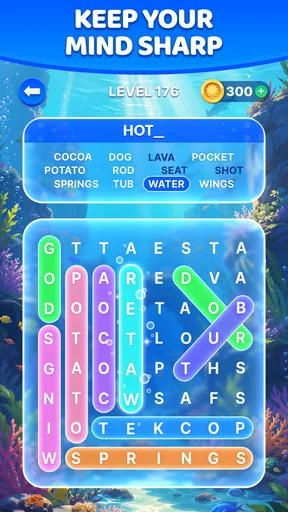
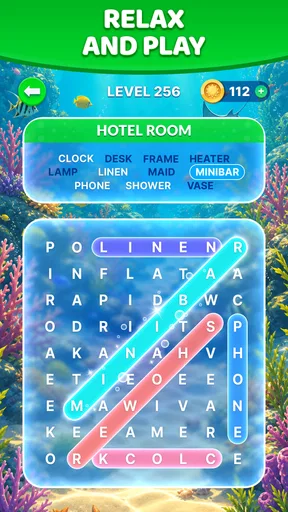
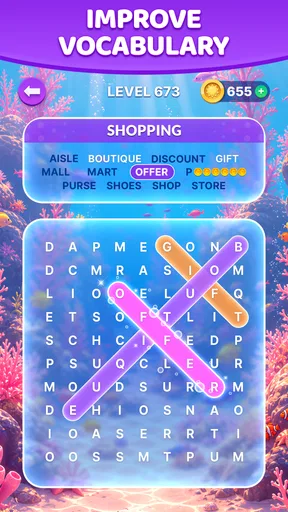
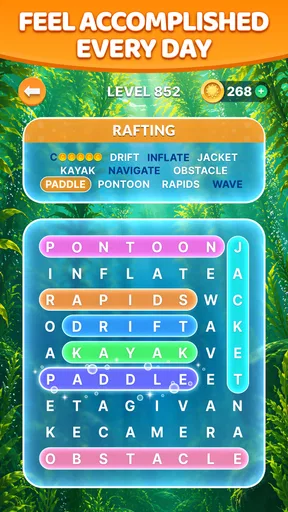
I like word-search games best when they give my hands something simple to do while my mind settles into a steady rhythm. Wordscapes Search: Word Games takes that familiar idea and frames it with scenic backgrounds, so the appeal is as much about the mood of a puzzle session as the words themselves. It is a free word game from PeopleFun, and its approachable presentation makes it easy to pick up for a short break without needing to learn a complicated ruleset.
A gentle first impression, built around the puzzle
The basic pleasure here is straightforward: look over a group of letters, trace out words, and keep going until the puzzle is complete. That simplicity is a real strength. I can open the game when I have a few spare minutes, understand what I’m meant to do immediately, and stop after a puzzle rather than needing to commit to a long session.
The scenery gives the experience a softer personality than a plain grid of letters. It helps make each puzzle feel like a small, contained pause rather than another task on a checklist. The art direction is most effective when it stays in the background: the words remain the focus, while the landscape gives the screen a sense of place.
This is a good fit for players who enjoy searching for words more than competing against a clock or managing a sprawling campaign. If you want a relaxing game to play while waiting for a meal, during a commute break, or at home between other activities, its low barrier to entry makes sense. I would not choose it for a demanding test of vocabulary or a fast, high-pressure challenge; its appeal lies in calm repetition.
Scenery that gives the screen a sense of place
In a word search, the setting cannot change the core logic: the letters still need to be scanned and words found. What the visual presentation can change is how that familiar task feels. Here, the scenic framing helps soften the puzzle interface and gives the eyes a place to rest between searches. That matters during longer play, when a bare grid can start to feel monotonous.
There is a useful trade-off in this approach. A tranquil backdrop can make the game feel more inviting, but players who prefer a crisp, stripped-down puzzle surface may find decoration less important than letter readability. I would recommend approaching it as a visually relaxed word game, not as a tool for intensive study. The scenery contributes to the experience, but it does not replace the satisfaction of spotting a word hiding in plain sight.
The game’s visual identity also makes it easier to settle into a repeatable routine. I might open it for one puzzle while taking a break, then continue if I still feel engaged. That flexibility is more valuable than it sounds: a game that can be enjoyed in small portions is easier to fit into an ordinary day than one that constantly pushes me toward a lengthy session.
Sound and pacing: a quiet kind of momentum
The intended mood is relaxed, and the puzzle format supports that by giving attention a simple target. Instead of following a complicated story or responding to a stream of rapid events, I can scan, test a possible word, and move on. That repeated loop creates its own pace. It feels suited to a few minutes of focused play, especially when I want something more engaging than scrolling but less demanding than a competitive game.
I would treat the audio as part of the atmosphere rather than the main attraction. The experience does not need a dramatic soundtrack to make the search satisfying; the mental rhythm of noticing letters and confirming a word does much of the work. If you prefer quiet play, this kind of game is easy to approach as a low-key companion activity. If sound is central to your idea of immersion, the word-finding itself—not a rich narrative or elaborate audio world—is what should decide whether it suits you.
A practical tip is to play in short, deliberate bursts instead of trying to force your way through when your attention is tired. Word searches reward steady scanning, and rushing can make obvious letter patterns harder to see. When I get stuck, I find it more useful to pause, shift my eyes to a different part of the available letters, and return with a fresh scan than to keep staring at the same combination. That small reset suits the game’s unhurried mood.
Where this word-search format fits
Compared with a crossword, this is a more direct kind of word puzzle: it emphasizes visual recognition rather than clues that ask you to retrieve a specific answer. Compared with a word-building game, the pleasure is less about inventing words from a rack and more about locating them in the puzzle. That distinction helps set expectations. If you enjoy the moment when a hidden sequence suddenly becomes clear, this format has a natural pull. If you prefer clues, strategic letter placement, or head-to-head pressure, another word game may hold your attention better.
One useful way to play is to scan systematically rather than jumping randomly around the screen. I look for likely starting letters, follow adjacent possibilities, and then move to another area if a promising path does not resolve. This keeps the search from turning into aimless visual hunting. It is a small technique, but it makes the puzzle feel more manageable and gives a session a calmer, more purposeful flow.
Another trade-off is that a familiar word-search loop can become repetitive for players who need a changing set of mechanics. The scenery helps the presentation feel warmer, but it does not make the underlying activity a different genre. I would suggest it to someone who genuinely likes word searches, not to someone hoping a scenic theme will transform a puzzle format they already find dull.
Everyday use, audience, and practical expectations
For a realistic everyday use, imagine having a short wait before an appointment. A quick puzzle gives you something focused to do without requiring a long setup or a complicated story to remember. At home, it can also work as a low-effort wind-down activity when you want to keep your mind occupied without taking on an intense challenge. The best sessions are the ones where the simple search is enough; there is no need to turn every spare moment into a long play streak.
The game is rated for Everyone, which makes its accessible word-search format suitable for a broad audience. It is free to download, with in-app purchases listed from $0.99 to $99.99 per item. I’d treat the free entry point as a chance to see whether the puzzle rhythm suits you, and make any purchase decision only after you know how often you actually want to play. The range of purchase prices is worth keeping in mind if you prefer to avoid spending inside games.
PeopleFun developed it, and its substantial audience is reflected in a 4.7 average from around 234,000 ratings, alongside over 10 million installs. Those figures suggest the format has broad appeal, but they cannot tell you whether you personally enjoy the pace. My advice is to judge it by a simple question: do you find tracing words through a puzzle relaxing, or does the repeated search begin to feel like busywork? Your answer matters more than popularity.
The game was released on November 22, 2019, and the current version is 1.56.0, with Android 7.0 or later required. Those details are useful when checking device compatibility, especially if you are using an older phone. They do not change the central decision, though: this is a casual word-search experience, not a broad collection of different puzzle styles.
Who should pick it up—and who may want another game
I would recommend Wordscapes Search to people who already enjoy spotting words in letter grids and want that activity presented with a gentler visual mood. It is also a sensible choice for someone who wants a game that can fit into short breaks without demanding fast reactions or elaborate planning. The scenery gives the familiar mechanic a little extra character, while the straightforward puzzle loop keeps the entry point friendly.
I would steer away if you need a strong narrative, frequent changes in gameplay, or a puzzle that challenges you through clues and deduction. A crossword is a better choice when you want language knowledge to lead the way; a timed word game may suit you better when energy and competition are the point. This game is at its best when you are happy to slow down and let visual searching carry the session.
A considered atmosphere verdict
What works for me is the coherence between the scenic presentation and the uncomplicated search mechanic. The art gives the puzzles a calmer setting, while the steady pace leaves room to focus on each group of letters. It does not need to pretend to be more complex than it is. Its limitation is also clear: if you tire of word searches, a pleasant backdrop will not provide the variety you are looking for.
Overall, I see it as a friendly option for brief, quiet puzzle breaks rather than an all-purpose word-game collection. Try it if a soothing setting and a simple search are exactly what you want; choose another format if you are looking for clues, strategy, or a more forceful pace. That is the fairest way to judge its appeal: the atmosphere makes the familiar activity more inviting, but the words remain the reason to stay.
Pros and cons
Pros
- Simple swipe controls make searching for words easy to learn.
- Short rounds work well for quick breaks.
- The gradual difficulty increase offers a steady challenge.
- Hints help when a word is hard to spot.
- Offline play makes it useful without an internet connection.
Cons
- Small letters may be difficult to read on some screens.
- Repeated puzzle layouts can feel predictable over time.
- Hints are limited unless you earn or obtain more.
- Later levels may require more patience and careful scanning.
- Ads can interrupt play between puzzles.


